What's Inside a Modular Data Center?
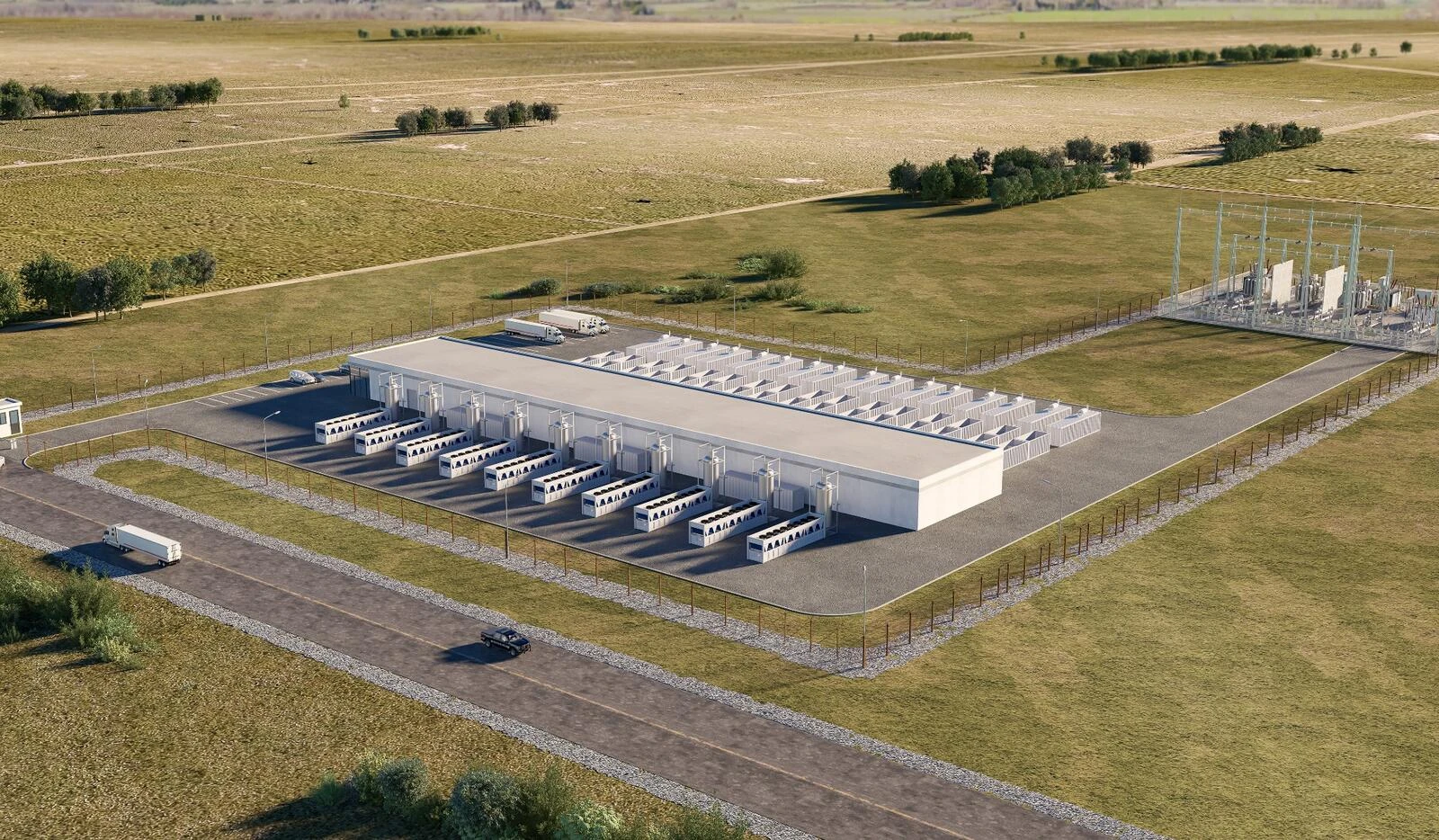
For most AI data center projects, the bottleneck isn’t GPUs. It’s time to power. Once you have a powered site, how quickly can you get infrastructure ready?
In a conventional build, crews do most of the electrical, mechanical, and piping work on site. Site conditions, equipment lead times, and the handoffs between systems can all push commissioning back.
A modular data center moves much of that work into the factory. Teams build and test modules while crews prep the site.
This post walks you through each system and what to look for.
What Is a Modular Data Center?
A modular data center brings together prefabricated units for IT, power, and cooling. Factory teams install the equipment, wire it, run the internal piping, and test each module before it ships. Crews then tie the modules together on site. You can start with the capacity you need today and add more in planned stages.
Modular, prefabricated, and containerized describe different aspects of the build. Modular is about how the units fit together and expand. Prefabrication is about assembling equipment at the factory before delivery. A container is one way to house a module.
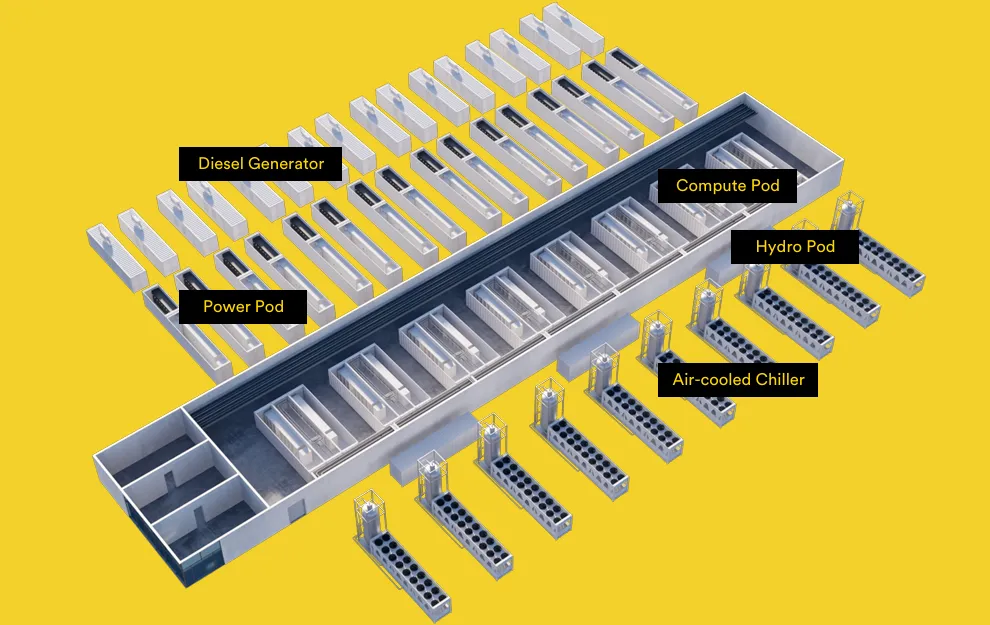
Main Components of a Modular Data Center
IT, power, and cooling are the core systems. Monitoring, fire protection, and site infrastructure keep them running safely.
Servers typically sit in a compute pod. Power distribution and backup generators get their own modules. Piping connects the pod to the pumps and the outdoor cooling equipment, carrying heat from the racks out to the air.
Compute Pod and IT Equipment
The compute pod holds servers, network switches, optical transceivers, fiber cabling, and storage. Busways and rack PDUs bring power to the racks.
Direct liquid cooling adds CDUs, supply and return piping, and rack connections. The CDUs can sit inside the pod or right alongside it.
What’s really changed is rack power. A traditional enterprise rack draws at least 20 kW. A GPU rack on air cooling can hit about 60 kW, while a system such as NVIDIA GB300 NVL72 runs on liquid cooling and draws around 142 kW per rack. Even NVIDIA Vera Rubin reaches a cabinet thermal design power of 330 kW in NVIDIA’s DSX reference design. Every one of those kilowatts needs cable, breaker capacity, and cooling behind it. That’s why you plan a compute pod around rack power, not rack count.
Whatever the liquid loop doesn’t cool still needs air to carry its heat away. Power cables, coolant pipes, network cables, and airflow all share the same space. The layout has to make room for all four while still leaving enough room to service the racks.
Power Module
The power module is usually a prefabricated electrical room. It holds low-voltage switchgear, a UPS, batteries, and the downstream distribution equipment.
Transformers and switchgear bring utility power onto the site, and the distribution system carries it to the racks. If the grid drops, the UPS and batteries keep critical equipment running for 5 to 10 minutes until another source picks up.
Meeting the normal load is only the start. The harder question is what happens when something fails or when you need to take equipment down for maintenance. That comes to the redundancy architecture of the system.
N+1 adds one spare unit beyond the N units needed to carry the design load. A 2N design gives you two independent systems, each able to carry the full load.
With 4N/3, four equal groups share the load, and any three can carry it. The power paths and controls have to let the remaining groups pick up the load when one goes offline.
The tradeoff is CAPEX. With 2N, you pay for two complete systems and the space to house them. A 4N/3 design needs less total capacity, but you have to work out exactly where the load goes when a group drops out.
Backup Power
A diesel generator module houses the generator set, controls, fuel system, ventilation, and exhaust equipment.
When the grid fails, the UPS carries critical loads while the generator starts. Once the generator’s voltage and frequency settle, the transfer system puts it on the load.
At an AI site, backup power has to keep the critical cooling equipment running too. Keeping the racks powered won’t help if they overheat.
Diesel isn’t the only option. Sites with a reliable gas supply can run natural gas generators, and batteries can cover shorter outages or work alongside generators. The right mix comes down to fuel availability, emissions rules, and how long the site needs to run without the grid.
Facility Water System
Pumps, pressure controls, filters, and water treatment equipment keep the facility loop moving between the compute pod and the outdoor cooling equipment. A heat exchanger inside the CDU moves heat from the server loop to the facility loop without mixing the fluids.
Adding AI racks means moving more heat. The pumps and pipes have to handle the extra flow. Assembling these components at the factory leaves less piping work for the site.
Can you isolate a pump for service without stopping cooling? Spare pumps, isolation valves, and the piping layout let you service individual sections while the rest of the system keeps coolant flowing.
Air-Cooled Chillers and Dry Coolers
The cooling loop carries heat out of the racks. Outdoor equipment then dumps it into the air.
An air-cooled chiller does that with a refrigeration cycle. When outdoor temperatures are low enough, a unit with free cooling can cut compressor run time or shut the compressors off.
Liquid cooling can also open up a simpler option. If outdoor temperatures are low enough for the required coolant supply temperature, a dry cooler can reject heat with coils and fans alone. Liquid-cooled servers now accept warmer coolant, making this practical at more sites. No compressor, no cooling tower, lower PUE.
Other Supporting Systems
Operators need to see how the site is running and catch problems early. The BMS watches the mechanical and electrical equipment, while DCIM tracks equipment, capacity, and operating data. Power meters track electricity use and supply status.
At AI sites, operators also have to watch rack power, coolant temperature, flow, pressure, and leaks. Alarms should point to the specific piece of equipment with the problem, and controls should trigger the response the design calls for.
Fire detection and suppression, access control, lightning protection, and grounding protect the site. These have to meet local codes and match the hazards the equipment presents.
The site also needs a grid connection, foundations, drainage, roads, and cable trenches. Delays here can hold up commissioning.
What is built in the factory, and what is not
Prefabrication reduces site work. Crews still need to position and connect the modules, then commission the complete system. Before manufacturing starts, the project team needs to agree on who handles each task.
| At the factory | On site |
| Build module structures and install internal wiring and piping | Obtain permits, connect utilities, and prepare the site |
| Install power, cooling, and rack equipment | Build foundations, cable trenches, roads, and drainage |
| Run FAT and agreed functional tests | Lift modules into place and connect power, piping, and networks |
| Inspect equipment and prepare delivery documents | Commission the complete site, test it under load, and complete acceptance |
Questions to ask a modular data center vendor
With a modular build, much of the risk moves from the construction site to the vendor’s design and factory. Five questions show whether a vendor can carry it:
- What form do the prefabricated modules take: containers, skids, or frames?
- Who owns the interfaces between modules?
- What work is left on site, and who does it?
- What’s the redundancy architecture or tier, and why?
- Has the team built and operated modular sites before, especially in North America?
How Fog Computing Builds Modular AI Data Centers
Fog Computing builds fully containerized modular data centers for sites from 1 to 50 MW: edge deployments, sovereign AI, and sites built around distributed power.
We’ve delivered 400 MW of mining infrastructure across 40 countries. That work taught us that modular projects succeed or fail on the interfaces between modules, logistics, and the team on site.
We’re developing data center projects both independently and with partners, with 100 MW in the pipeline. Explore our products or contact Fog Computing to discuss a project.